

How to highlight your size in a knitting pattern
By Marlpin · 31 October 2026
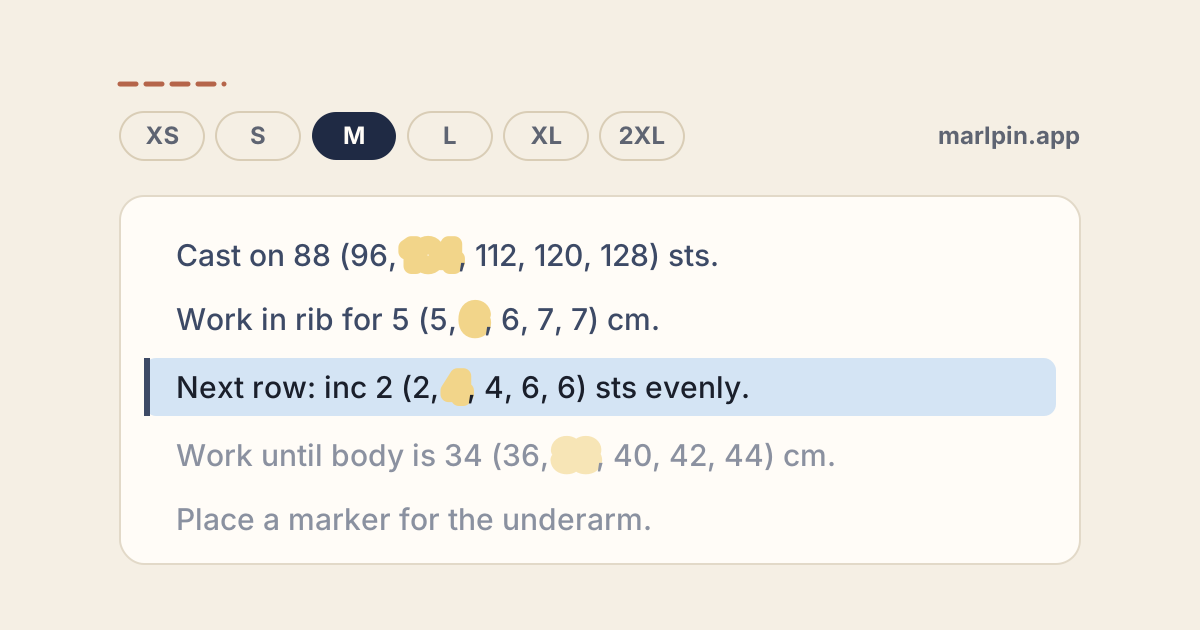
Your size is a position, not a number. Find where it sits in the pattern's size list, then mark the number in that same position in every list before you cast on. Mark it once, and you never count through parentheses mid-row again.
How patterns list sizes
Multi-size patterns give the smallest size first and the others in parentheses, in the order of the Sizes list at the top (Purl Soho, Interweave). The order never changes, so your size keeps its position all the way through.
Sizes: XS (S, M, L, XL, 2XL)
Cast on 88 (96, 104, 112, 120, 128) sts.
Work in rib for 5 (5, 6, 6, 7, 7) cm.
Inc 0 (2, 2, 4, 4, 6) sts evenly across.
A few rules cover the rest:
- 0, a dash or an x means the step doesn't apply to your size: skip it (Purl Soho, A.C.T. Techniques).
- One number, or "all sizes", means everyone works the same step (Interweave).
- Two groups of parentheses, such as 1 (2, 3, 4, 5) (6, 7, 8, 9), only make a long list easier to read. Count your position across both groups (Elizabeth Smith Knits).
- Parentheses also hold repeats, such as (k2, p2). If the items are stitches rather than plain numbers, it's a repeat, not a size list (Purl Soho).
- German and French patterns keep the same order but label sizes differently: paired sizes such as Größe 36/38 (40/42, 44/46) (example), or numbered ones such as taille 1 (2, 3), with a key to the bust size each number stands for.
The lists keep getting longer. A 2020 review of 479 size-inclusive sweater and top patterns found 9 sizes per pattern on average, and up to 20 (Susanna Winter).
Choose your size first
Pick your size from the finished measurements, not your body measurements. The difference between the two is ease (Interweave). The Craft Yarn Council's fit chart puts a standard fit at 2–4 in (5–10 cm) more than your bust or chest (Craft Yarn Council).
Check the schematic too: it gives each piece's measurements for every size. Some brands, DROPS among them, give finished widths measured flat, so double them before you compare (DROPS).
Four ways to mark your size
| Method | How it works | Best for | Watch out for |
|---|---|---|---|
| Highlighter on a printout | Highlight your number in every list, or cross out the others | Printed patterns | Slow on a long pattern, and a new size means a new printout |
| Cheat sheet | Copy only your numbers onto a card, step by step | Short patterns | One copying slip and you knit the wrong count |
| PDF markup on a tablet | Highlight by hand with Markup in the Files app, or in GoodNotes or Notability | PDFs you read on an iPad | The same manual work as paper, and the markup changes or copies your file |
| An app that marks your size | Pick your size once; the app finds your numbers on every page and marks them | Long patterns with many sizes | Scans have no text layer, so some apps can't find their numbers; check the app leaves your file unchanged |
Knitters have used the first three for years (Knotions, Tin Can Knits, Yarn Bending). Whichever you choose, mark the whole pattern before you cast on, not as you go.
Mistakes to avoid
- Counting from the parentheses. The number before them is the first size, so the first number inside them is the second size.
- Switching sizes partway. Marking everything first stops you drifting to a neighbouring size mid-project.
- Missing size-only steps. Lines such as "sizes 5–9 only" break the shared list, so mark those too (Interweave).
- Fixing numbers that aren't wrong. Neighbouring sizes often share a stitch count or a length, so a repeated number is rarely a typo (Knotions).
- Losing count in long lists. With nine or more sizes, find your position on the Sizes line once and write it at the top: "size 6, sixth number".
Can I mark up a pattern I bought?
For your own copy, almost always. Patterns are protected by copyright (UK IPO), and pattern licences generally let you print and mark up your copy for your own knitting but not share it (Pascuali). Check the licence on your pattern, and keep the marked-up copy to yourself.
Let Marlpin mark it for you
Marlpin is our app for iPad and iPhone. Pick your size once and it tints your numbers in every instruction of your PDF, without changing the file. It's coming soon to the App Store.
One email when Marlpin launches — no spam. See our privacy note.
Sources
- Purl Soho: How to read a knitting pattern
- Interweave: How to read a knitting pattern
- Tin Can Knits: Reading multi-size pattern instructions
- A.C.T. Techniques: Understanding a pattern with multiple sizes
- Elizabeth Smith Knits: How patterns use parentheses to organize sizes
- Susanna Winter: Size inclusivity in knitting patterns
- Craft Yarn Council: Body sizing and fit
- DROPS: Size charts
- Knotions: Tips for patterns with multiple sizes
- Yarn Bending: Marking up patterns digitally
- UK IPO: Copyright notice on knitting and sewing patterns
- Pascuali: Sharing isn't always okay
- Ravelry: a German pattern with paired sizes